


Online Store
Package
Fibre
Promotion
Entertainment
Lifestyle
Privileges
Help & Support
Back
Go to
Promotion
New Deals Update!
Package Promotion
Mobile, Accessories & SIMs
Bank Promotions / Loans
Go to
Lifestyle
AI Service
App and Digital Service
Insurance And Protection
Verify Service
Financial
Blog Review
Go to
Help & Support
Online store
Package & Devices
Fibre
Lifestyle & Entertainment
Network & Technology
Cyber threat alerts
myAIS
Go to
Switch to AIS
Back
Go to
Accessories
Go to
Gadgets & Lifestyle
Go to
Recommend
Go to
Postpaid
Go to
Prepaid
Go to
Postpaid
Go to
Prepaid
Go to
Hi-light
Go to
Package
Go to
On-Top Services
Go to
AIS PLAY
Go to
Streaming App
Go to
Sports
Go to
Games
Go to
Blog Review
Go to
Highlight
Go to
Reward
Go to
AIS Points
Go to
AIS Serenade
Go to
Online store
Go to
Package & Devices
Go to
Fibre
Go to
Cyber threat alerts
Go to
myAIS
Enterprise
SME
Privileges
Digital eServices
News and Activity
Contact us
Back
Go to
Enterprise
Technology and Solution
Industries
Success Tech Inspired
Communities & Partners
Sustainability Business
Smart Digital Insights
中国企业
Go to
SME
Post Paid Package
On Top Package
Internet Services
Digital Marketing Services
Cloud & IT Solutions
SME Promotion
Go to
Privileges
Highlight
Privileges for AIS Customers
Business Privileges
Exclusive Privileges
Voice of Customer
Back
Go to
Technology and Solution
Go to
Industries
Go to
Sustainability Business
Go to
Smart Digital Insights
Go to
中国企业
Go to
Post Paid Package
Go to
On Top Package
Go to
Internet Services
Go to
Cloud & IT Solutions
Go to
SME Promotion
Go to
Online Store
Go to
Streaming App
Go to
Articles
Go to
Announcements
Go to
AIS Webinar
Go to
Success Stories
Go to
Contact Us
Go to
Mission & Vision
Go to
Download
Network & Technology
Investor
The Startup Thailand
PR-NEWS
Careers
Contact us
Back
Go to
Network & Technology
AIS 5G, Thailand's First and Genuine 5G Leader
AIS 5G for Industry
NB-IoT
Go to
Investor
Financial Highlights
Listing Information
Stock Quotes
Board of Directors
Event Calendar
Go to
Term and Legal
Terms and conditions for using AIS One-2Call!
Terms and conditions for using AIS Postpaid
Back
Go to
AIS 5G for Industry
Go to
SUPER WiFi
Go to
NB-IoT
Go to
Financial Highlights
Go to
Listing Information
Go to
Stock Quotes
Go to
Board of Directors
Go to
Event Calendar
Go to
Vacancy
Go to
Development with AIS
Go to
AIS Culture
Go to
Benefit
Go to
Contact HR



Online Store
Package
Fibre
Promotion
Entertainment
Lifestyle
Privileges
Help & Support
Back
Go to
Promotion
New Deals Update!
Package Promotion
Mobile, Accessories & SIMs
Bank Promotions / Loans
Go to
Lifestyle
AI Service
App and Digital Service
Insurance And Protection
Verify Service
Financial
Blog Review
Go to
Help & Support
Online store
Package & Devices
Fibre
Lifestyle & Entertainment
Network & Technology
Cyber threat alerts
myAIS
Go to
Switch to AIS
Back
Go to
Accessories
Go to
Gadgets & Lifestyle
Go to
Recommend
Go to
Postpaid
Go to
Prepaid
Go to
Postpaid
Go to
Prepaid
Go to
Hi-light
Go to
Package
Go to
On-Top Services
Go to
AIS PLAY
Go to
Streaming App
Go to
Sports
Go to
Games
Go to
Blog Review
Go to
Highlight
Go to
Reward
Go to
AIS Points
Go to
AIS Serenade
Go to
Online store
Go to
Package & Devices
Go to
Fibre
Go to
Cyber threat alerts
Go to
myAIS
Enterprise
SME
Privileges
Digital eServices
News and Activity
Contact us
Back
Go to
Enterprise
Technology and Solution
Industries
Success Tech Inspired
Communities & Partners
Sustainability Business
Smart Digital Insights
中国企业
Go to
SME
Post Paid Package
On Top Package
Internet Services
Digital Marketing Services
Cloud & IT Solutions
SME Promotion
Go to
Privileges
Highlight
Privileges for AIS Customers
Business Privileges
Exclusive Privileges
Voice of Customer
Back
Go to
Technology and Solution
Go to
Industries
Go to
Sustainability Business
Go to
Smart Digital Insights
Go to
中国企业
Go to
Post Paid Package
Go to
On Top Package
Go to
Internet Services
Go to
Cloud & IT Solutions
Go to
SME Promotion
Go to
Online Store
Go to
Streaming App
Go to
Articles
Go to
Announcements
Go to
AIS Webinar
Go to
Success Stories
Go to
Contact Us
Go to
Mission & Vision
Go to
Download
Network & Technology
Investor
The Startup Thailand
PR-NEWS
Careers
Contact us
Back
Go to
Network & Technology
AIS 5G, Thailand's First and Genuine 5G Leader
AIS 5G for Industry
NB-IoT
Go to
Investor
Financial Highlights
Listing Information
Stock Quotes
Board of Directors
Event Calendar
Go to
Term and Legal
Terms and conditions for using AIS One-2Call!
Terms and conditions for using AIS Postpaid
Back
Go to
AIS 5G for Industry
Go to
SUPER WiFi
Go to
NB-IoT
Go to
Financial Highlights
Go to
Listing Information
Go to
Stock Quotes
Go to
Board of Directors
Go to
Event Calendar
Go to
Vacancy
Go to
Development with AIS
Go to
AIS Culture
Go to
Benefit
Go to
Contact HR

Explore games the way you want
Choose the package that your playstyle
- Select Premium or Classics to see the games waiting for you -


No results found 🎮
No results found 🎮
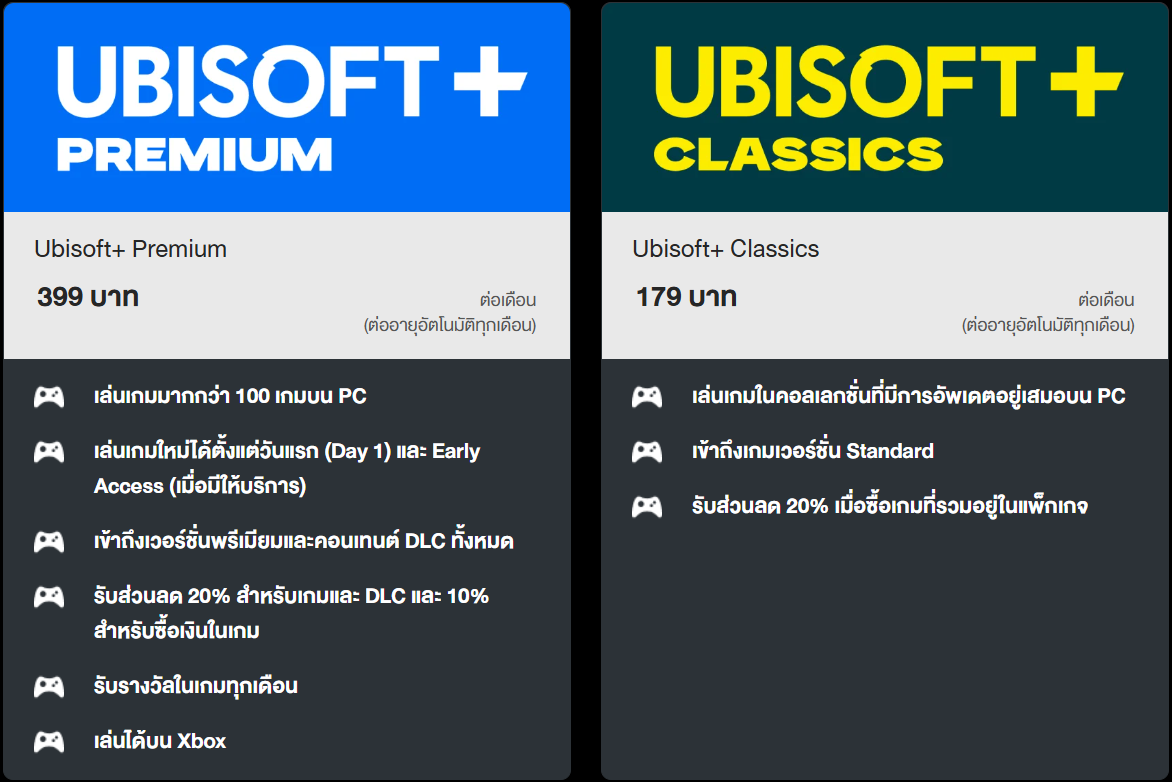
Ubisoft+ Plans
Choose a plan that fits your gaming needs
Ubisoft+ Premium
399 Baht
per month
(Renewed every month)

Ubisoft+ Classics
179 Bath
per month
(Renewed every month)
FAQ

- Select the package you would like to subscribe to.
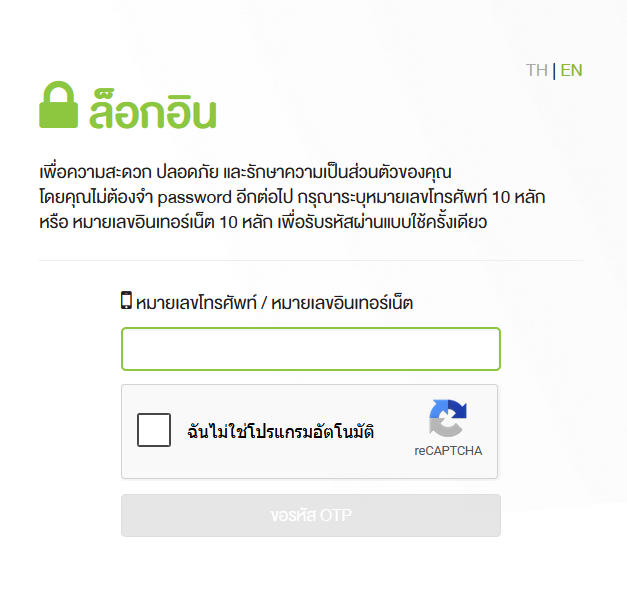
- Enter your AIS / AIS Fibre3 number and verify via OTP
- New customers: Click “Create an Account” to create a Ubisoft account
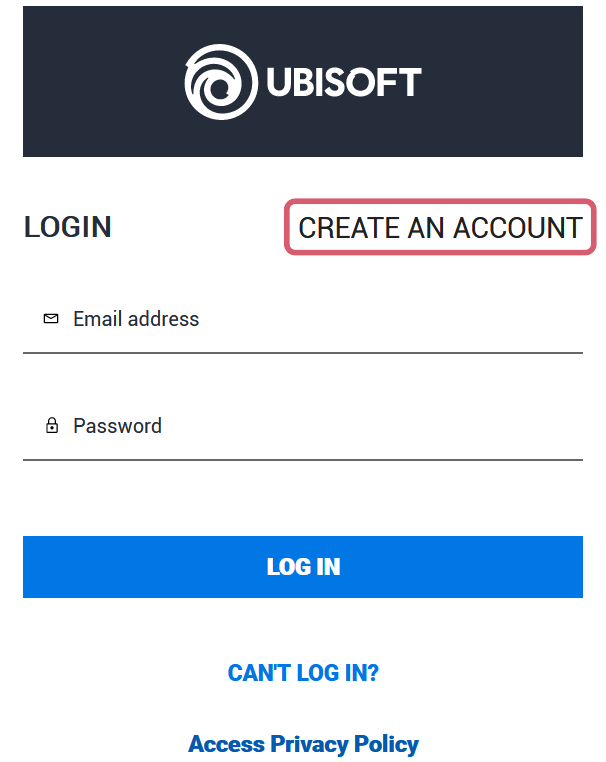
* If you already have an existing Ubisoft+ account, you can simply log in using your email and password
- Enter your email/password, set a username, and tick both Ubisoft policy checkboxes
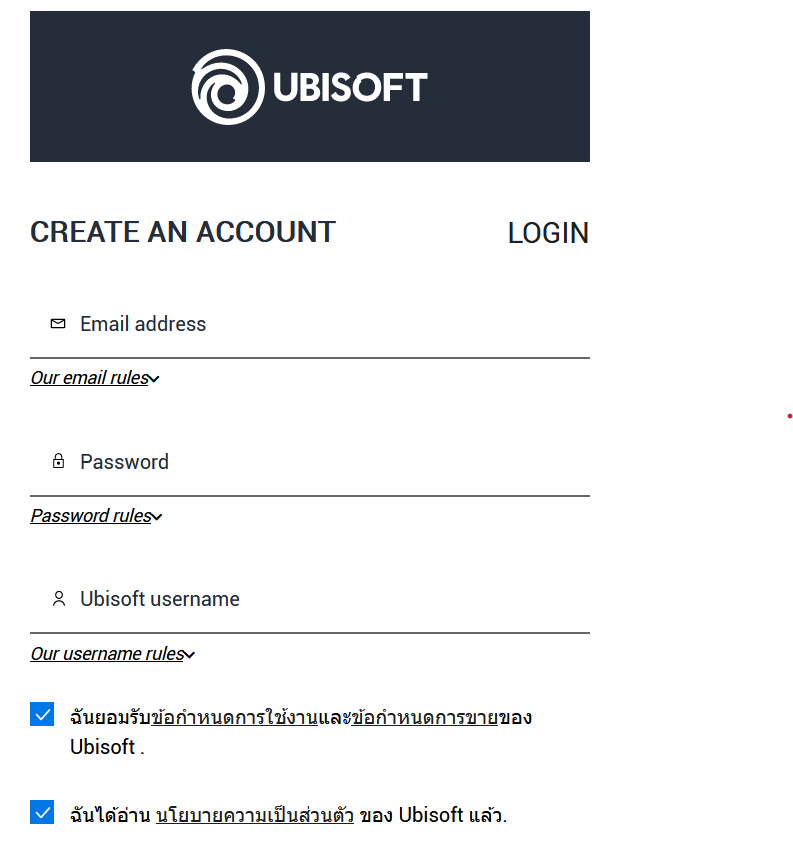
- The system will send an OTP to your email. Enter the OTP received and click “Create Account”
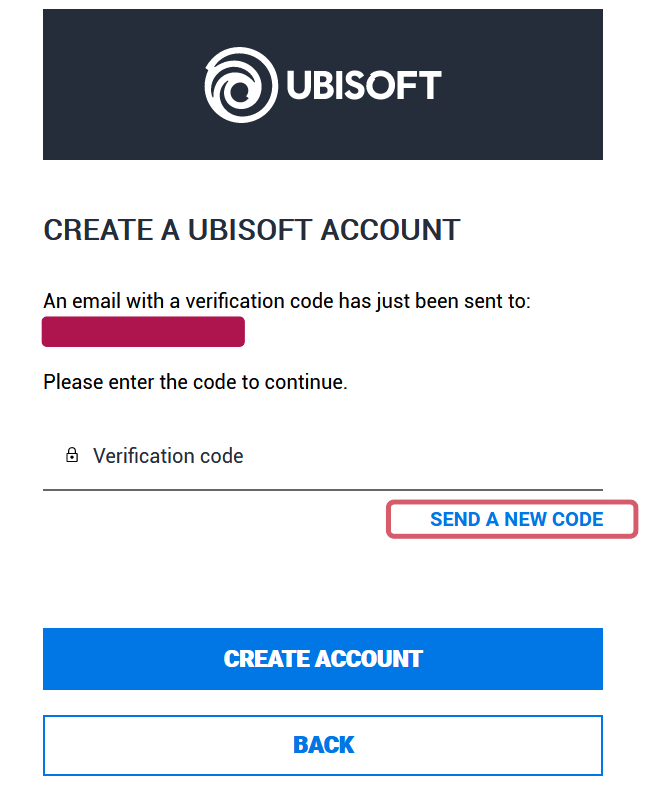
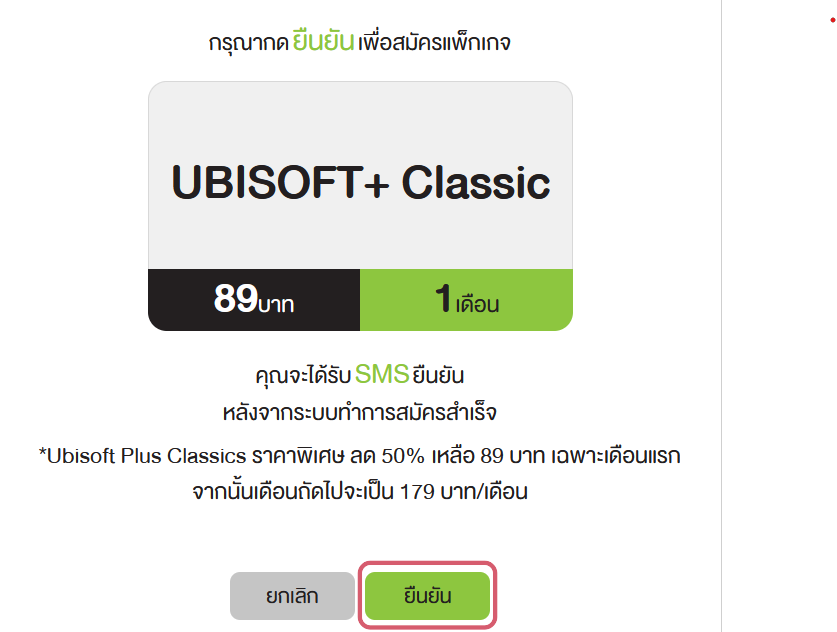
- The system will then display your selected package. Click “Confirm” to complete the subscription
- Click the “Start Playing” button, and the system will redirect you to the Ubisoft Connect page
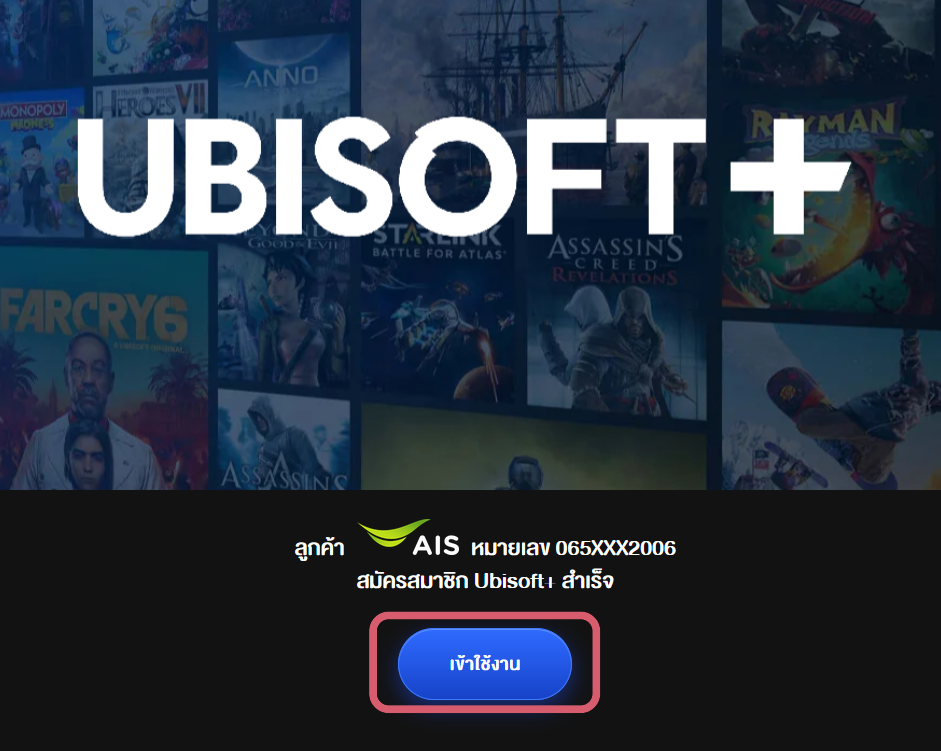
* Customers must download Ubisoft Connect to play Ubisoft+
Additional Information
- The Ubisoft+ package can be cancelled at any time via the My AIS app
- Customers will also receive a confirmation SMS after successful subscription
- The package fee is eligible for Serenade privilege calculation and AIS Point accumulation
- After successfully subscribing, go to Ubisoft Connect: https://m.ais.co.th/playubisoft
- Click “Download Ubisoft Connect” at the top right and install it on your PC.
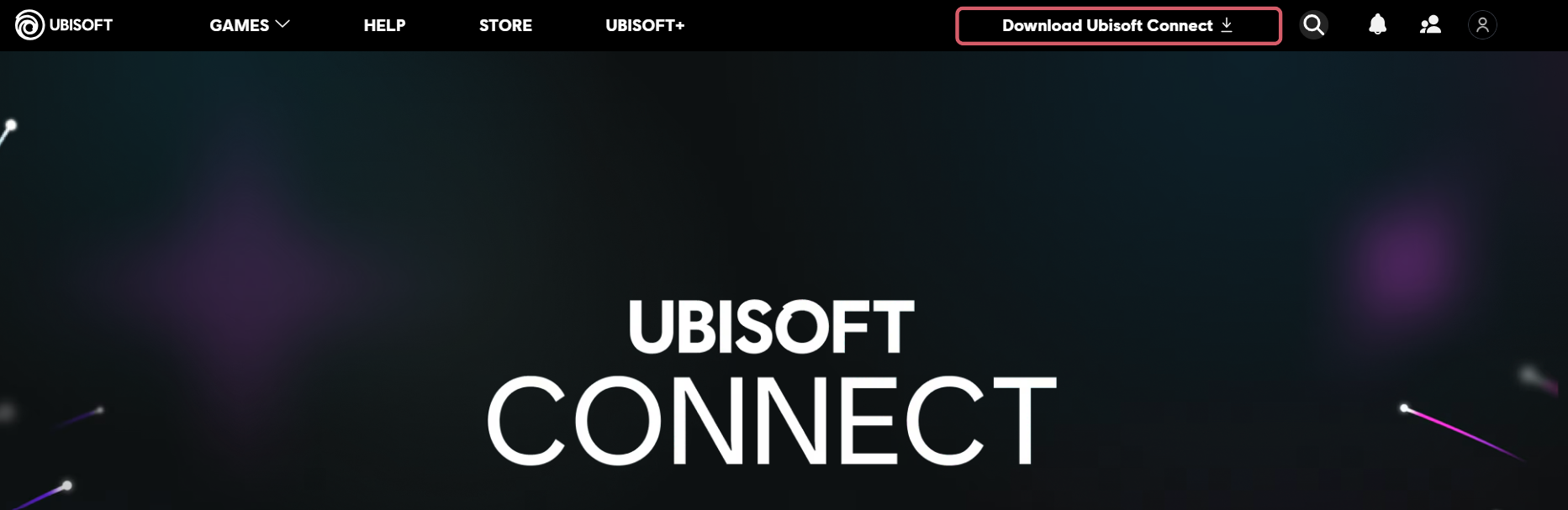
- Once the installation is complete, open the Ubisoft Connect app and log in with your username and password.
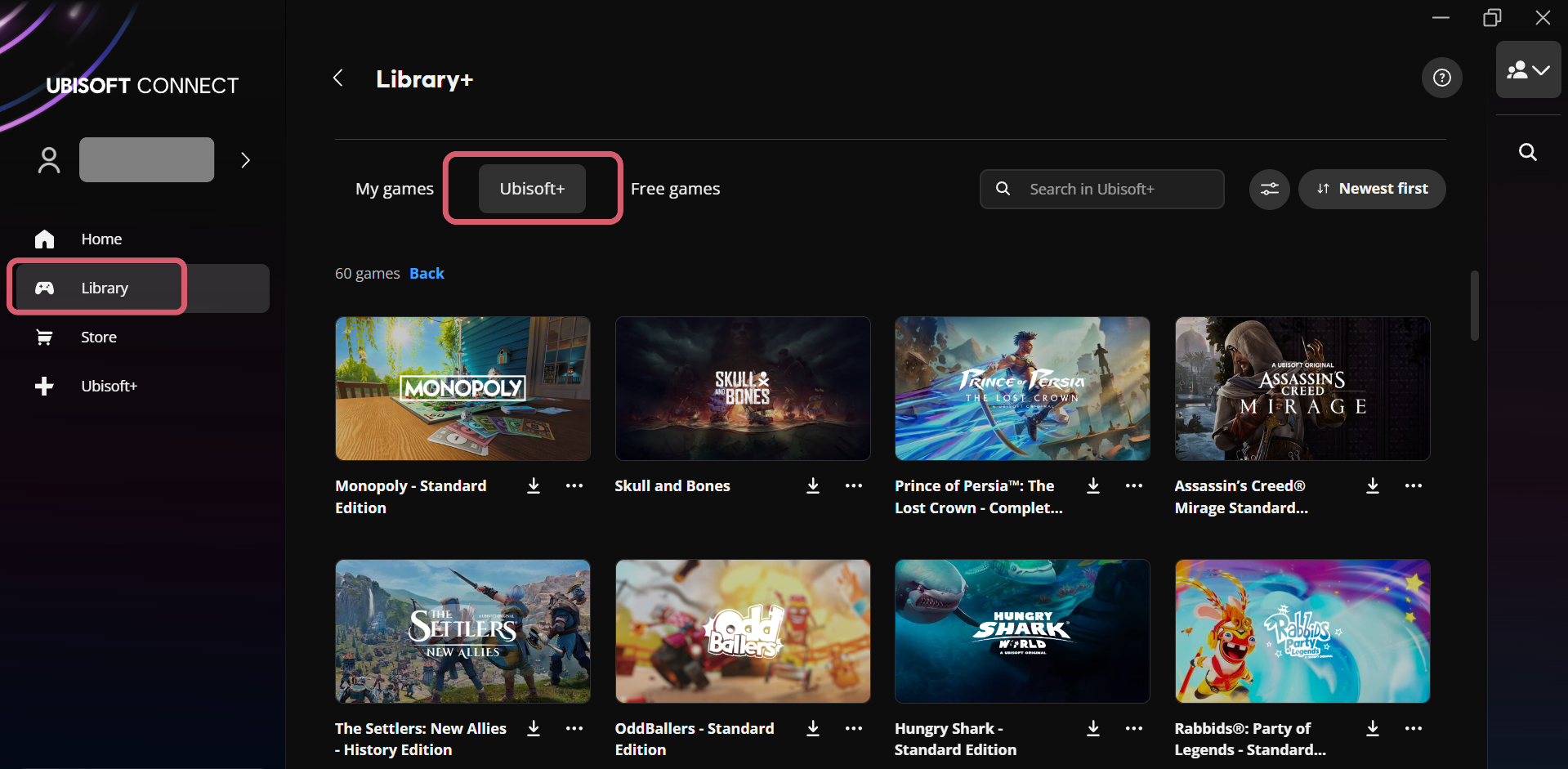
- Then go to Library, select Ubisoft+, choose the game you want to play, and click “Download.”
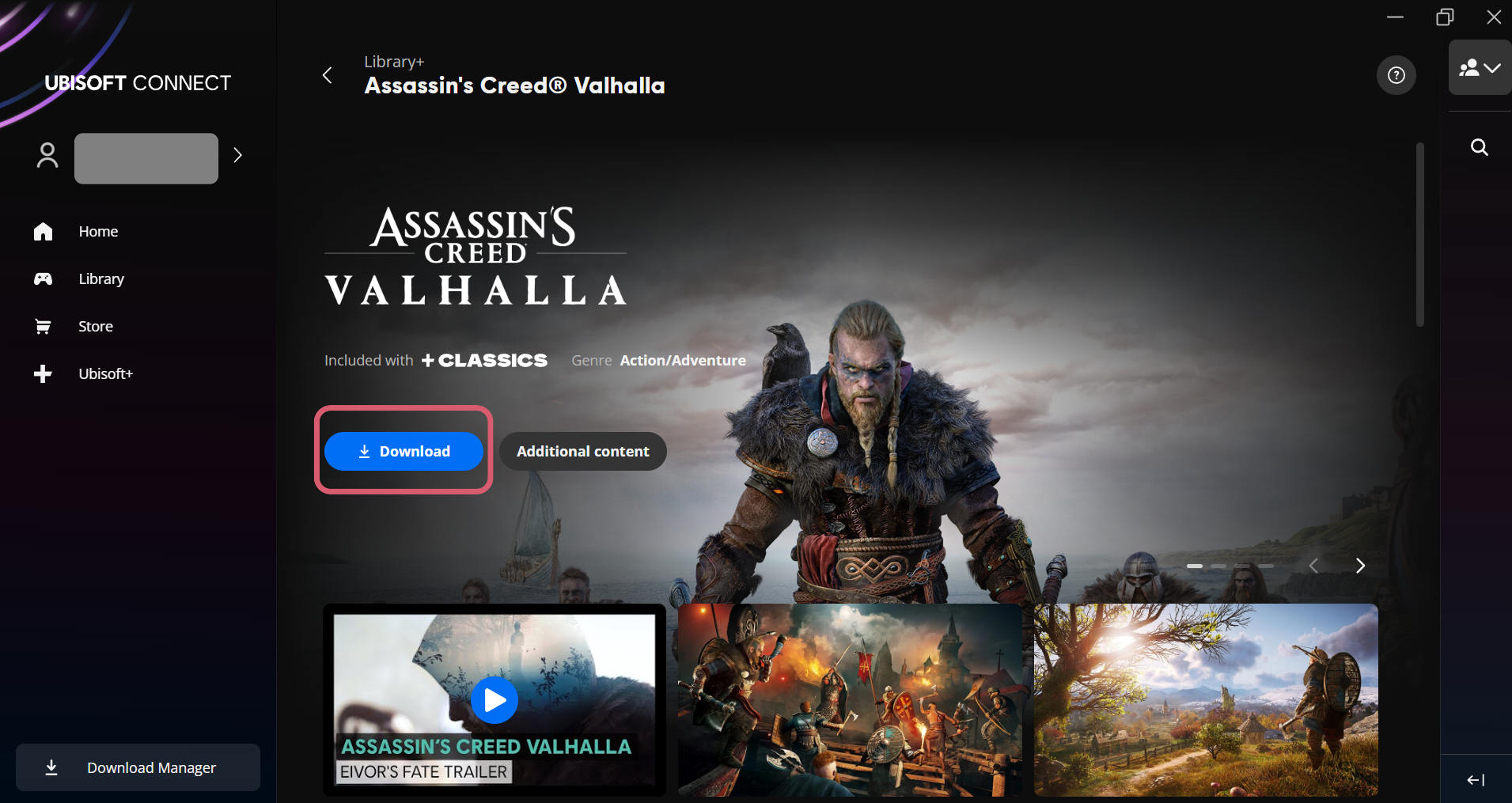
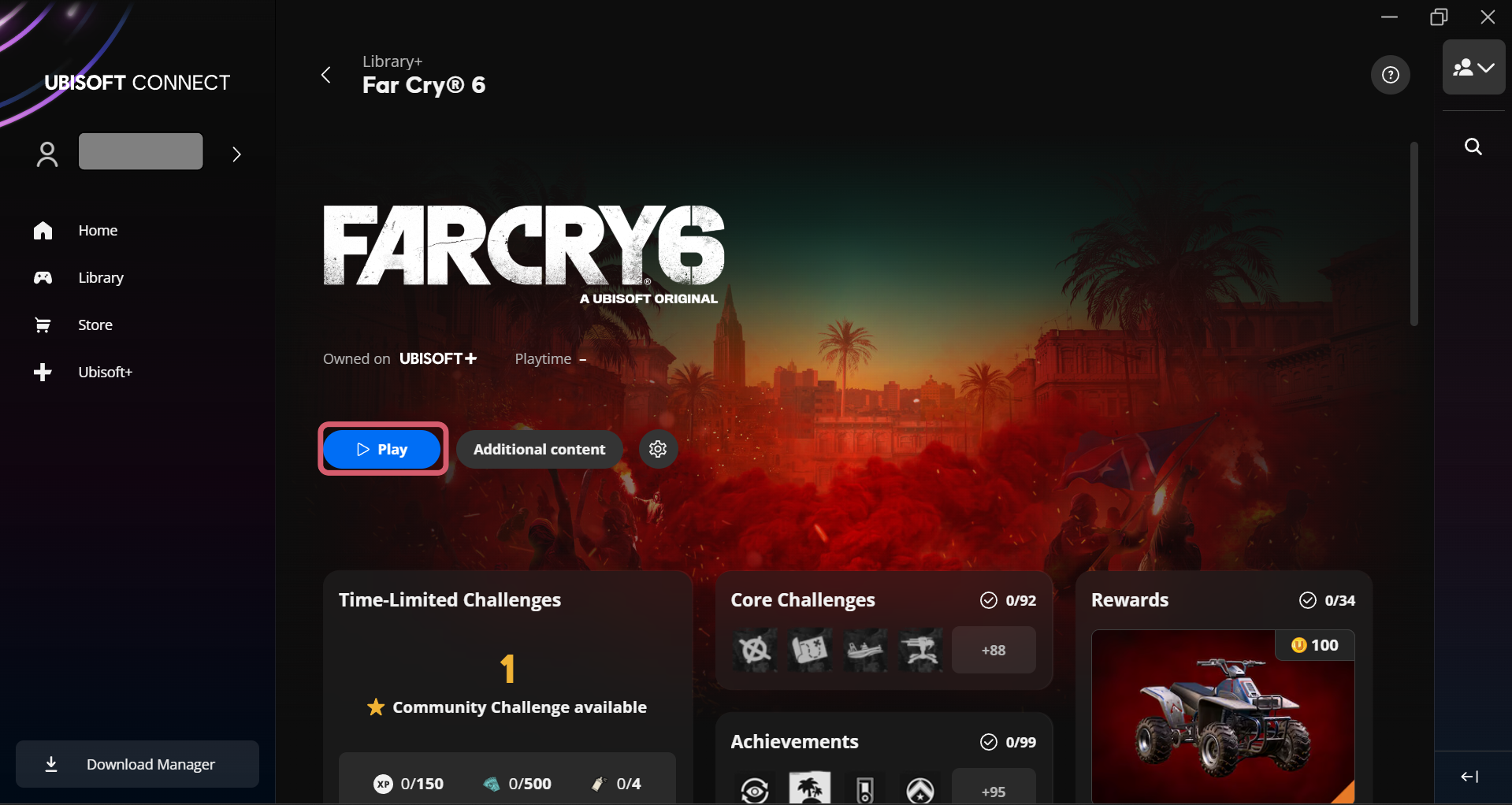
- After the download is complete, click “Play” to start the game.
For customers who subscribed to Ubisoft+ via Postpaid or Prepaid mobile number
- Open the "My AIS" app and tap on "Packages"
- Select "My Packages"
- Scroll down and select Ubisoft Plus package, then tap "Cancel Package"
- Tap “Confirm Cancellation” to complete the process
For customers who subscribed via AIS Fibre3/3BB
- Please contact the AIS Call Center at 1175 to request service cancellation
We recommend contacting the product owner via this link: https://www.ubisoft.com/th-th/help
- Windows OS (PC, Notebook)
- macOS (Mac PC, MacBook)
Download myAIS app


Follow us


© 2026 Advanced Info Service PLC. All rights reserved.
×